The Problem
The Hardware Stack
- Tuya PIR Motion Sensor (WiFi-based, battery-powered)
- UniFi U6-Pro Access Point (running syslog forwarding to local server)
- Mini PC running Node-RED and our monitoring services
- Tuya Smart Bulb & Exhaust Fan (local TCP control)
- tinytuya Python library for local status checks
Bypassing the Handshake Bottleneck
- Wait for the PIR sensor to wake up and connect to WiFi.
- Poll the device's status locally or wait for Tuya Cloud to trigger a webhook.
- Verify that the sensor is reporting "pir" (motion).
- Turn on the bathroom light and exhaust fan.
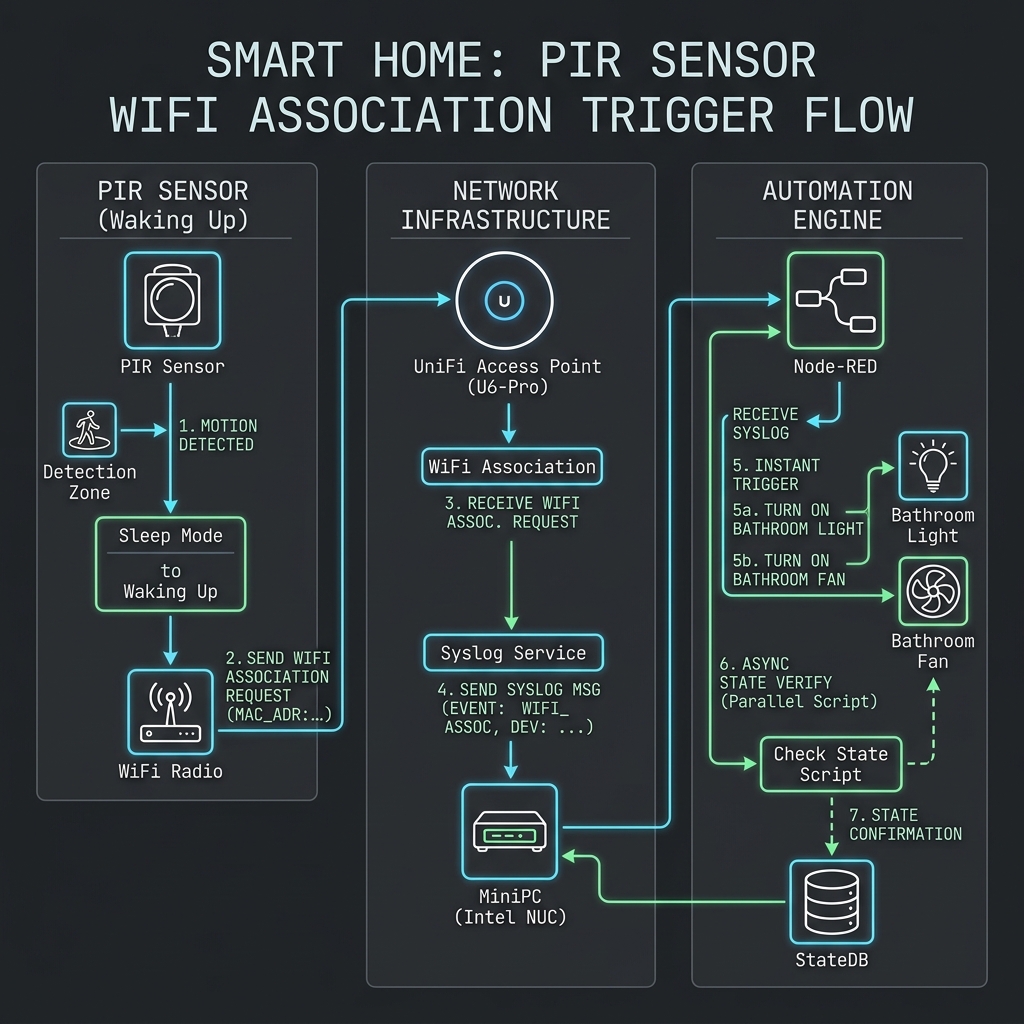
The Optimistic-ON Pattern
- Path 1 (Optimistic-ON): The moment a syslog packet matches the PIR sensor's MAC address (10:5a:17:7e:e1:d3), turn the light and exhaust fan ON immediately and cancel any active off-timers.
- Path 2 (Async Verify): In parallel, Node-RED launches a background verification script to query the actual state of the sensor.
The Verification Script
Tier 1: Aggressive Local TCP Polling
Python
def query_local(ip, dev_id, key):
    # Short-timeout local TCP query with retries
    for attempt in range(1, 13):
        try:
            d = tinytuya.OutletDevice(dev_id, ip, key)
            d.set_version(3.3)
            d.set_socketTimeout(0.25) # Short timeout
            d.set_socketRetryLimit(1) # Fail fast
            status = d.status()
            if status and "dps" in status:
                val = status["dps"].get("1") or status["dps"].get(1)
                return {"success": True, "motion_state": val, "attempt": attempt}
        except Exception:
            pass
        time.sleep(0.2)
    return {"success": False}
Tier 2: Cloud API Fallback
Python
def query_cloud(dev_id):
    config = load_cloud_config()
    try:
        cloud = tinytuya.Cloud(
            apiRegion=config.get("apiRegion", "us"),
            apiKey=config.get("apiKey"),
            apiSecret=config.get("apiSecret")
        )
        status = cloud.getstatus(dev_id)
        if status and status.get("success") and "result" in status:
            for item in status["result"]:
                if item.get("code") == "pir":
                    return {"success": True, "motion_state": item.get("value")}
    except Exception:
        pass
    return {"success": False}
Latency Breakdown
- T + 0.0s: User steps into the bathroom. The PIR sensor detects heat, powers up, and starts WiFi association.
- T + 3.5s: The sensor completes WiFi association.
- T + 3.9s: The UniFi AP generates a syslog event and sends it to the Mini PC.
- T + 4.0s: Node-RED parses the syslog and fires the ON command. The light turns ON. (Total latency: ~4.0s).
- T + 4.5s: The parallel check_pir.py script makes local TCP contact on attempt 3, confirms motion: true, and returns JSON.
Before and After Comparison
Metric | Old Sequential / Cloud Method | Optimistic-ON / Syslog Method |
|---|---|---|
| Total Turn-ON Latency | 5.0 – 10.0+ seconds | ~4.0 seconds |
| Trigger Signal Source | Tuya Cloud Push / TCP Poll | UniFi AP WiFi Association Syslog |
| WiFi Boot & Assoc Time | 3.5s (blocking flow) | 3.5s (parallelized) |
| Verification Method | Wait for TCP handshake + reply | Immediate ON, async verification check |
| Heartbeat Handling | Ignored (no light trigger) | Turns on, triggers off-timer after 5s verification |
Key Takeaways
- Leverage the network layer for low-latency triggers. Battery-powered IoT devices are bound by physics; they take time to boot and connect. Sniffing WiFi association events (via syslog, ARP, or DHCP packets) gives you an early warning signal seconds before the device is ready to communicate.
- Decouple trigger from verification. In UX design, perceived speed is everything. Act "optimistically" on the earliest signal, then verify and correct in the background.
- Local API fallback is critical. WiFi devices on battery have erratic networks. Having a dual local TCP + Cloud API fallback ensures that even if local polling fails, the automation recovers and handles the state correctly.
This optimization is part of my ongoing Home Operations project, where I use custom Node-RED automation, local syslog parsing, and InfluxDB telemetry to build a responsive smart home.