Jakarta, Indonesia
Posts

Why My Smart Home Dropped Offline Every 5 Minutes (And How a DHCP Table Fixed It)

A few weeks after deploying my real-time monitor pattern, I noticed something unsettling in Grafana: every 5 minutes, all 8 device connections dropped simultaneously, creating a 30-60 second data blackout. And one device — a recently re-paired dishwasher outlet — had logged 25,000+ consecutive errors in a single day. The monitor pattern itself was working perfectly. The issue was around it: how the service discovers device IP addresses on the local network. If you read the previous post, you know the setup: 8 Tuya devices → tuyamon Python service on a minipc → InfluxDB → Grafana. What's new here is a device I added recently: the Smart Outlet Dishwasher, and the networking equipment that becomes relevant — the EdgeRouter (USG-3P) acting as DHCP server for the LAN. This turned into a late-night hardening session. Three problems, three solutions — each building on the last. The dishwasher outlet had been removed and re-added in the Tuya app (WiFi network change). When you do this, the device gets a new encryption key. The old key in devices.json was now stale, causing error 914 on every connection attempt:
[Smart Outlet Dishwasher] Key/version error (914)
[Smart Outlet Dishwasher] Key/version error (914)
[Smart Outlet Dishwasher] Key/version error (914)
... (25,000+ times)
The fix was straightforward — regenerate devices.json from the Tuya Cloud API:
Bash
cd /opt/tuyamon
sudo python3 -m tinytuya wizard
# Downloads fresh device keys from Cloud API
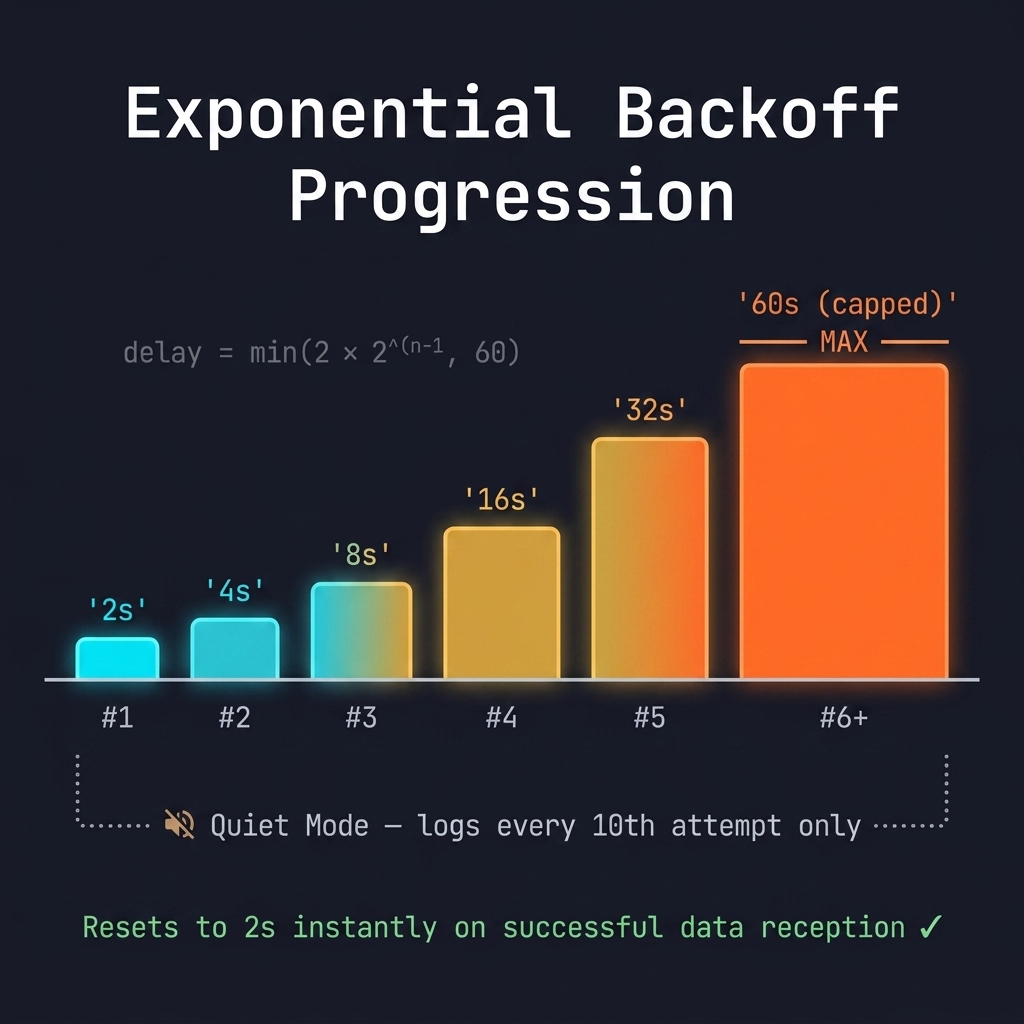
This fetches all device metadata including the new key. After restarting the service, error 914 was gone instantly. But why did 25,000 errors accumulate in one day? Because the service retried every 2 seconds with no backoff. An unreachable device generated 43,200 error lines per day — enough to fill disk and obscure real issues. The solution: exponential backoff with a quiet mode.
Backoff Progression: 2s → 4s → 8s → 16s → 32s → 60s (capped)
Python
# Backoff constants
BACKOFF_INITIAL = 2     # Starting delay (seconds)
BACKOFF_MAX = 60        # Cap
BACKOFF_FACTOR = 2      # Multiplier per failure
BACKOFF_QUIET_AFTER = 10  # Reduce log noise after N attempts

# In the reconnection handler:
reconnect_count += 1
if reconnect_count <= BACKOFF_QUIET_AFTER or reconnect_count % 10 == 0:
    logger.warning(f"[{name}] Reconnecting in {delay:.0f}s (attempt #{reconnect_count})")
shutdown_event.wait(reconnect_delay)
reconnect_delay = min(reconnect_delay * BACKOFF_FACTOR, BACKOFF_MAX)
The key details:
  • Progression: 2s → 4s → 8s → 16s → 32s → 60s (capped)
  • Quiet mode: After 10 attempts at max backoff, only logs every 10th attempt
  • Reset: Instantly resets to 2s on successful data reception
  • Same formula twice: Applied to both the outer reconnect loop and initial status failures
With backoff, a 24-hour outage generates ~1,400 log lines instead of 43,200. That's a 97% reduction in log noise. The 30-60 second blackout every 5 minutes was the most impactful problem. Here's why it happened: The old approach: devices.json from the Tuya Cloud API contains WAN IPs (public IPs), not LAN IPs. To find the actual local IP of each device, the service ran tinytuya.deviceScan() every 5 minutes — a UDP broadcast that scans the entire LAN. The problem? Tuya devices support exactly one TCP connection at a time. The UDP broadcast disrupts the active connection on each device. So every 5 minutes:
  1. Close all 8 persistent connections
  2. Send UDP broadcast
  3. Wait for responses (10-30 seconds)
  4. Reconnect all 8 devices (20-30 seconds)
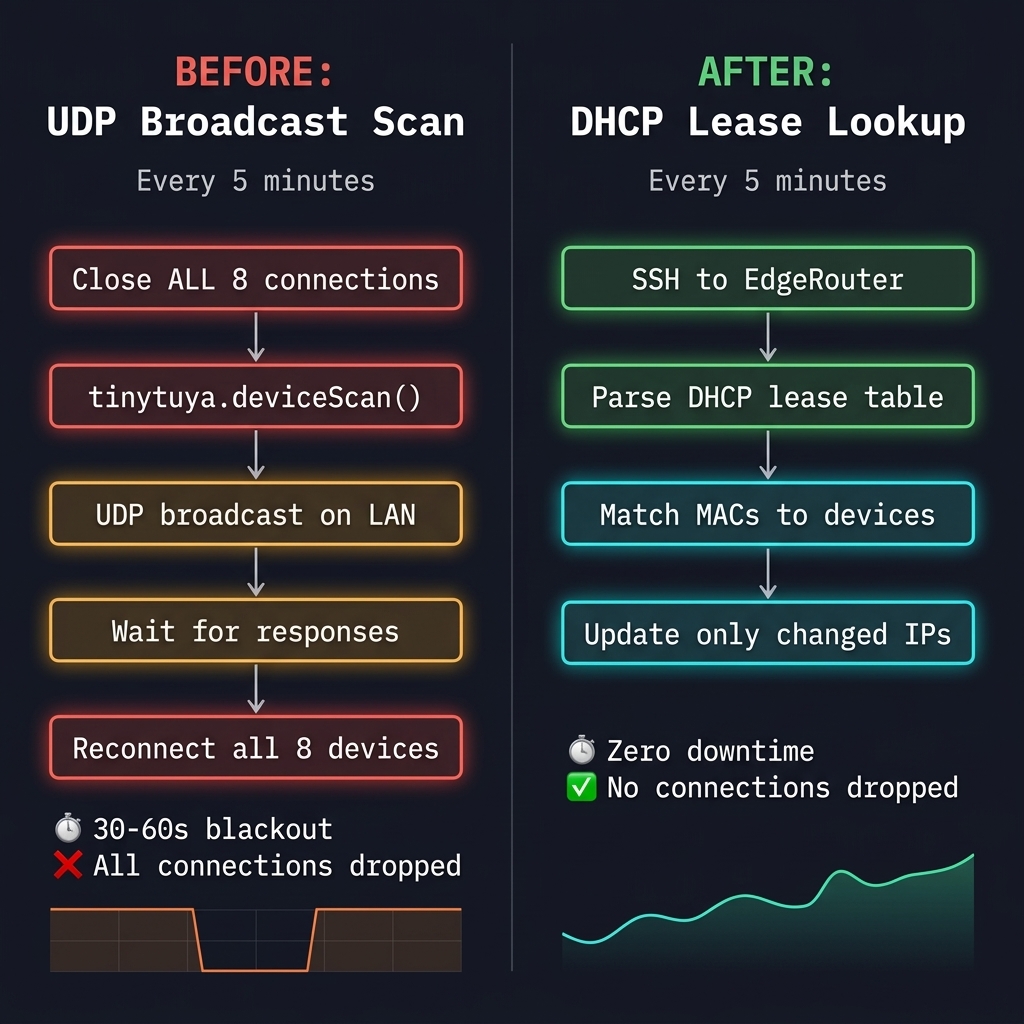
That's 30-60 seconds of complete data blackout. Every. Five. Minutes.
Before vs After: UDP Broadcast Scan vs DHCP Lease Lookup
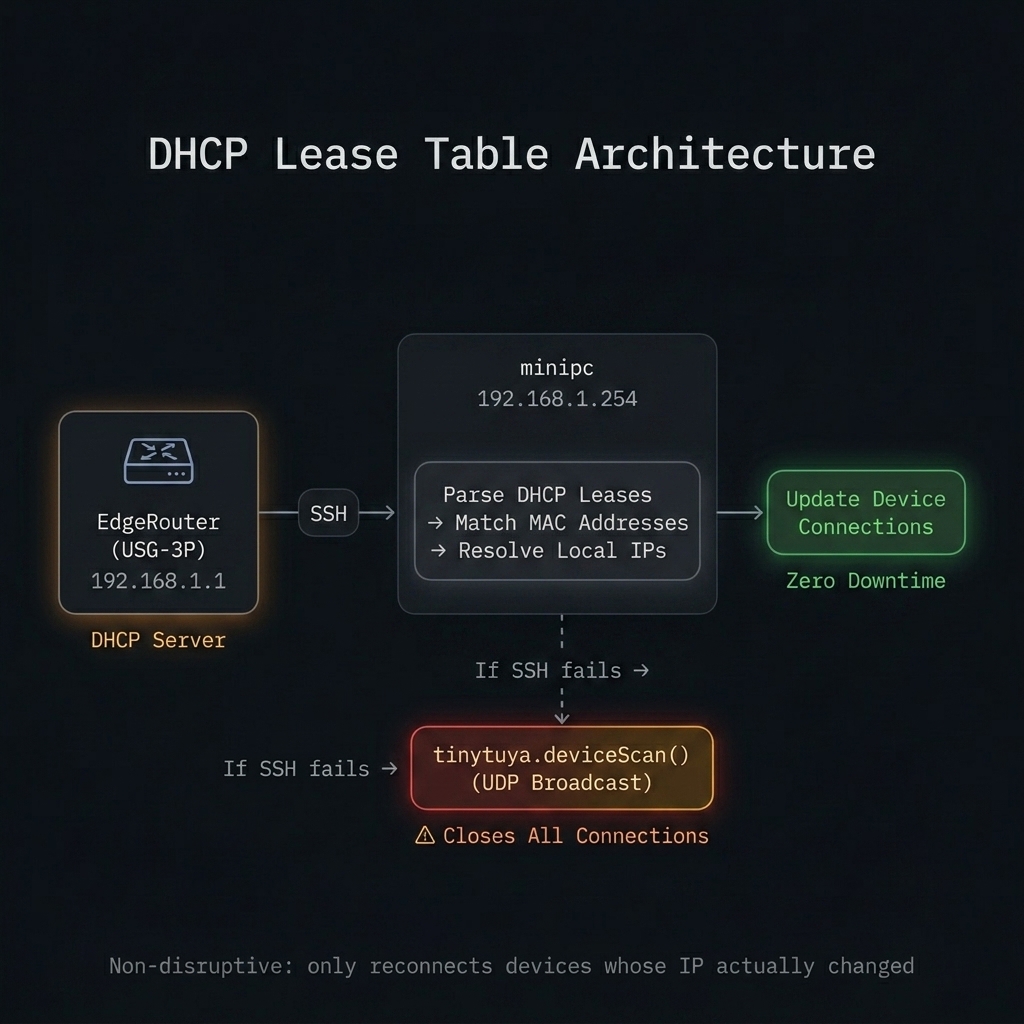
The new approach: SSH to the EdgeRouter and query its DHCP lease table. Every device on the LAN gets its IP from this router via DHCP, so the lease table is a complete, authoritative mapping of MAC addresses to local IPs — with zero network disruption.
DHCP Lease Table Architecture
Python
EDGEROUTER_HOST = "192.168.1.1"
EDGEROUTER_USER = "angga"
EDGEROUTER_KEY = "/root/.ssh/id_rsa"
EDGEROUTER_SSH_OPTS = [
    "-o", "ConnectTimeout=5",
    "-o", "PubkeyAcceptedAlgorithms=+ssh-rsa",  # Old EdgeOS compatibility
    "-o", "HostKeyAlgorithms=+ssh-rsa",
    "-o", "StrictHostKeyChecking=no",
    "-o", "BatchMode=yes",
]

def resolve_ips_from_dhcp():
    cmd = [
        "ssh", *EDGEROUTER_SSH_OPTS,
        "-i", EDGEROUTER_KEY,
        f"{EDGEROUTER_USER}@{EDGEROUTER_HOST}",
        "/opt/vyatta/bin/vyatta-op-cmd-wrapper show dhcp leases",
    ]
    result = subprocess.run(cmd, capture_output=True, text=True, timeout=15)

    # Parse: "192.168.1.75  4c:a9:19:44:62:6d  2026/04/15 ..."
    dhcp_by_mac = {}
    for line in result.stdout.splitlines():
        parts = line.split()
        if len(parts) >= 2 and parts[0].startswith("192.168."):
            dhcp_by_mac[parts[1].replace(":", "").lower()] = parts[0]

    # Match monitored devices by MAC
    for dev in devices:
        mac_norm = dev.get("mac", "").replace(":", "").replace("-", "").lower()
        dhcp_ip = dhcp_by_mac.get(mac_norm)
        if dhcp_ip and dev.get("ip") != dhcp_ip:
            dev["ip"] = dhcp_ip
            close_persistent_connection(dev)  # Only reconnect if IP changed
            logger.info(f"[{dev['name']}] DHCP resolved IP: {dev['ip']} -> {dhcp_ip}")
A few details worth noting: SSH compatibility quirk: The EdgeRouter (USG-3P) runs an older version of EdgeOS with an OpenSSH server that only supports ssh-rsa. Modern SSH clients disable this by default, so you need PubkeyAcceptedAlgorithms=+ssh-rsa to connect. I spent 20 minutes debugging "permission denied" before figuring this out. MAC normalization: DHCP leases use colon-separated MACs (4c:a9:19:44:62:6d), while devices.json might have dashes or different cases. Normalizing to lowercase hex-only string ensures reliable matching. Selective reconnection: The old approach closed all connections before scanning. The new approach only closes and reconnects a device if its IP actually changed. In practice, DHCP leases are stable for days — so most 5-minute scans result in zero reconnections. Graceful fallback: If SSH to the EdgeRouter fails (router rebooting, network issue), the service falls back to the old tinytuya.deviceScan() UDP broadcast. Degraded, but still functional:
Python
def device_data_scan_thread():
    while not shutdown_event.is_set():
        shutdown_event.wait(DHCP_SCAN_INTERVAL)  # 5 minutes
        if shutdown_event.is_set():
            break

        if not resolve_ips_from_dhcp():
            # Fallback: disruptive UDP scan
            logger.warning("DHCP lookup failed. Falling back to UDP scan.")
            for dev in devices:
                close_persistent_connection(dev)
            update_device_data()
Metric
Before
After
IP ResolutionUDP broadcast (disruptive)DHCP lease table (non-disruptive)
Data Blackout30-60s every 5 minZero
Connections DroppedAll 8, every scanOnly if IP changed (rare)
Error Logs (24h outage)43,200 lines~1,400 lines (97% reduction)
Stale Key RecoveryManual discoverytinytuya wizard + restart
Scan Duration10-30s (UDP timeout)<1s (SSH + parse)
The Grafana dashboard now shows a continuous, unbroken line across all 8 devices. No more periodic dips. No more error floods. The service has been running for days with zero errors, zero reconnections, and zero data gaps. 1. Your router's DHCP table is an underused goldmine. Every device on your LAN is already registered in it. Instead of probing the network with broadcasts (which disrupt existing connections), just ask the router what it already knows. One SSH command, instant results. 2. Tuya Cloud IPs are WAN IPs, not LAN IPs. The devices.json from tinytuya wizard contains the IP that the Tuya Cloud sees — your public/WAN IP. You always need a second step for local IP discovery. DHCP lease lookup is the cleanest option. 3. Exponential backoff is table stakes. A fixed 2-second retry loop turns a single offline device into 43,200 error lines per day. Backoff with quiet mode makes the same situation manageable. It's a few lines of code — there's no excuse not to. 4. Old SSH servers need explicit algorithm allowlists. If your IoT infrastructure runs older firmware (like EdgeOS on a USG-3P), modern SSH clients will silently reject the connection. PubkeyAcceptedAlgorithms=+ssh-rsa is the fix. Document this or you'll lose 20 minutes next time. 5. Selective reconnection > bulk reconnection. The old scan closed all 8 connections regardless. The new approach only reconnects devices whose IP actually changed. Since DHCP leases are typically stable, this means zero reconnections on most scans — the ideal outcome.
This is Part 2 of my home IoT monitoring series. Part 1: From Polling to Push: Achieving Real-Time Tuya Power Monitoring. Both optimizations are part of my ongoing Solar Home System project.
On this page